Troubleshooting & FAQs
- What
is DLT approval, and do I need it?
 opt-out
 Fill in the required informationfail foryourseveralcampaign. This includes:reasons:-
CampaignCarrierName:Filtering:ProvideTheamobileuniquecarrierand(e.g.,descriptiveVerizon,nameT-Mobile)formayyourhavecampaign.filtered the message as potential spam. This can be caused by using spam-trigger words, "spammy" URLs, or sending too many messages too quickly. -
Audience:Invalid Number:DefineThethephoneaudiencenumberforisyouracampaign.landline, is no longer in service, or is formatted incorrectly. -
Message Template:Opt-Out/DND:SelectThe contact has previously replied "STOP" or is registered on apre-approvednationalmessageDotemplateNotor create a new template.Disturb (Note:DND)DLT approval is mandatory in India). Personalization:For personalization, click onAdd placeholderto add merge tags.
-
Send a test to yourself to verify the content and personalization.Once satisfied, clickNext.list.- you
Selectgoanoverexistingthissegmentlimit,oryourcreatemessage will consume more than one credit. For example, anew200-characterone. ClickNext.You have two options for scheduling:One-time:The campaignmessage will be sentonceasasone message but consumes two credits. Using emojis or non-standard characters can also reduce the character limit perthe scheduled date and time.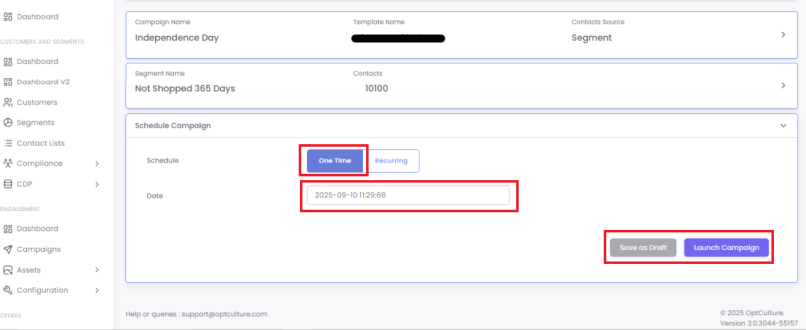
segment.-
Recurring:Q: Why should I use the "Ramp up" feature?A: The
campaign"Ramp up" feature is a best practice for improving your sender reputation with mobile carriers. Sending a massive blast of 100,000+ messages all at once canbegetsentyourrepeatedly,Sender ID flagged as spam. "Ramp up" prevents this by sending your campaign in smaller, controlled batches over time (e.g., 2,000 contacts per hour). This ensures better deliverability forexample,largeoncampaigns.Q: How do I track link clicks in my SMS?
A: When you add a
daily,URLweekly,tomonthly,yourormessage,yearlyourbasis.platform gives you the option to automatically shorten it and enable click-tracking. This not only saves valuable character space but also allows you to see exactly which contacts clicked your link in the campaign's performance report.
-
RampQ:up:My personalization (merge tag) showed up blank. Why?A: This
featurehappenshelpswhen the contact record youdividesent to does not have data for that specific field. For example, if you used|FirstName|but thechosencontact'ssegmentprofileintohassmallnobatchesfirstofnameuniquesaved,contactsthe(thistag will be blank. It isdoneimportantbytoenteringmaintaina Send Volume)clean and complete contact data for personalization to work correctly.Q: What is the best time to send an SMS campaign?
A: Because SMS is so immediate and personal, timing is critical. It's best to send during normal "socially acceptable" hours, such as 10:00 AM to 7:00 PM. Avoid sending messages too early in the morning or too late at night. For time-sensitive flash sales, send the
samemessagecampaign2-4 hours before the offer's start or end time for maximum impact.Q: How many SMS campaigns should I send?
A: Be respectful of your audience's inbox. Unlike email, "less is more" with SMS. Sending too frequently is the fastest way to
goodeachgetofopt-outs.thoseAbatches.- starting
For example,a segment consists of 10,000 contacts. If you want to send the campaign dailypoint for5mostdaysbrandssuch that the campaign reaches all 10,000 contacts exactly once, you chooseisDaily,2-4specifymarketingFrommessagesandperTodates, enable thesend rate ramp up, and enter thesend volume as 2,000month.ByTransactionaldoingmessagesthis,(liketheordersystemconfirmations)willdopicknot2,000countuniquetowardcontactsthisfrom the chosen segment and send the campaign until all the contacts have been covered.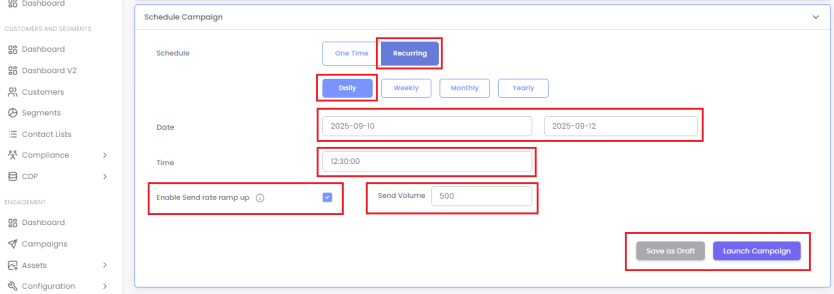
Once you've chosen your schedule, you can either clickSave as DraftorLaunch Campaign.ClickingLaunch Campaignsaves the campaign and sends it at the scheduled time.
Q:
StepA: 1:DLT Navigate(Distributed Ledger Technology) is a mandatory registration system in India to Campaignsregulate
SelectSMS Campaignstraffic and clickprevent spam. If you are sending messages to any customers in India, you must register your Sender ID (also called a Header) and all your message templates on thea DLT platform. Campaigns sent without DLT approval will be blocked by carriers.
+CreateQ: How can customers opt-out of SMS campaigns?
A: You are required to provide a Campaignclear button.
- simple
Selectin SMSyour frommessages. The standard is "Reply STOP to unsubscribe." The OptCulture platform automatically processes these "STOP" replies and adds the availablecontact "Modeto ofa Communication"suppression options.list to ensure they do not receive future SMS messages.
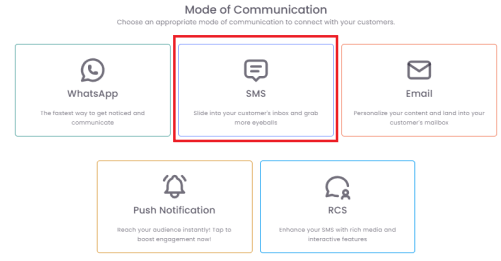
StepA: 2:Message Enterdelivery Campaigncan Details
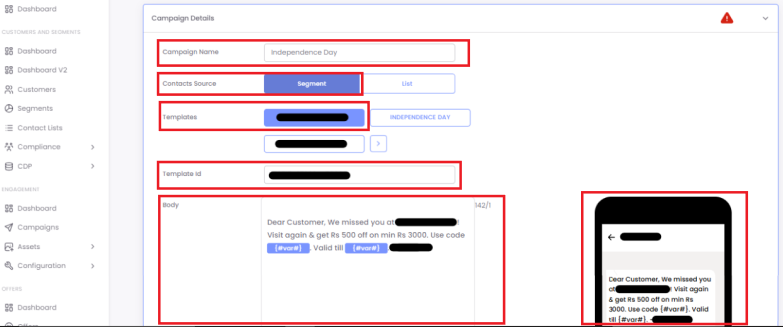
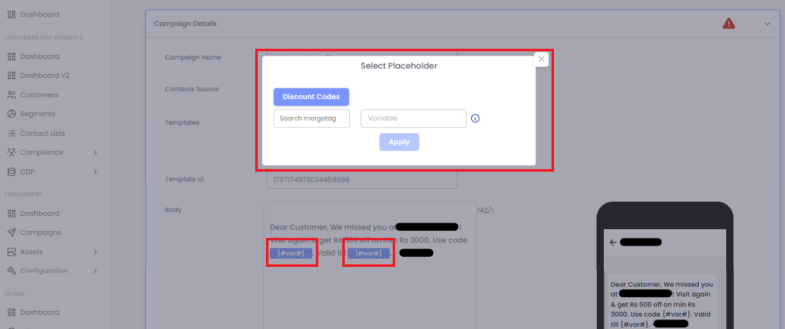
Step 3: Test Your Campaign
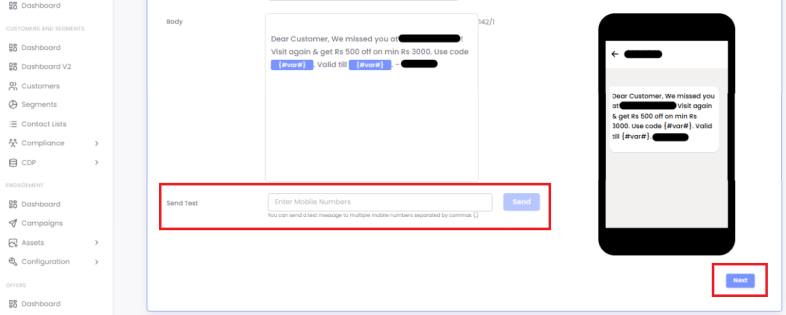
StepA: 4:A Selectstandard YourSMS Segmentmessage is 160 characters.
- If