Key Features & Interface Capabilities
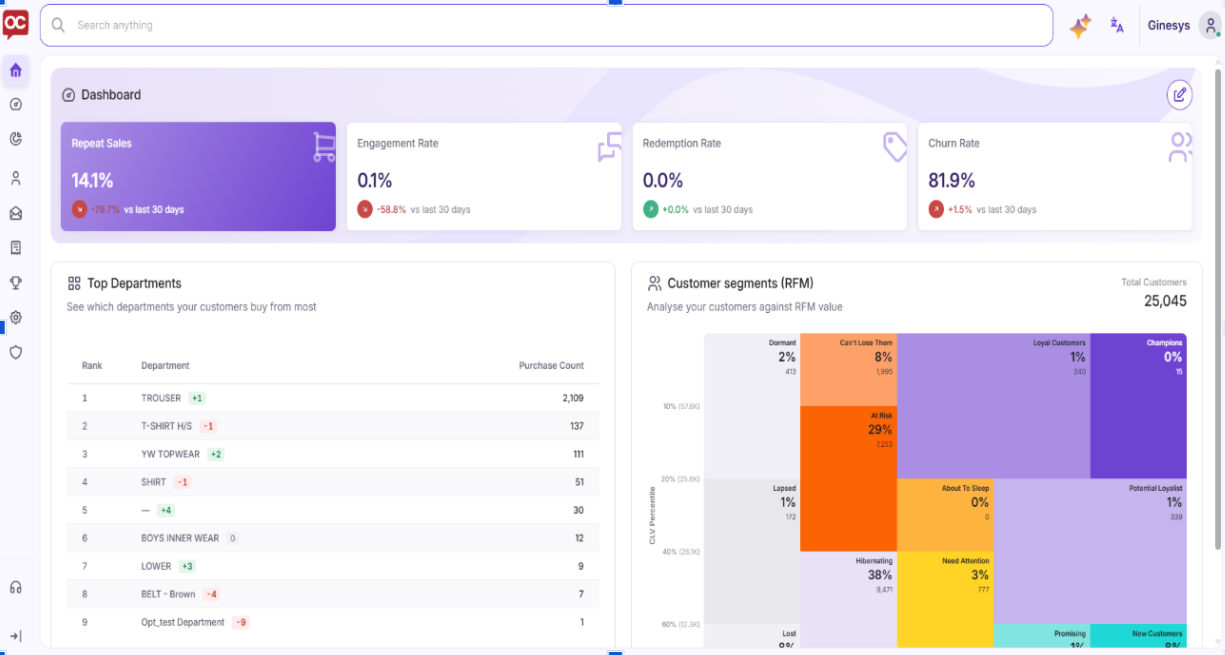
1. Key Performance Indicator (KPI) Banner
Located at the top of the Home Screen, the KPI Banner displays high-level account performance metrics compared to previous timeframes:
-
Repeat Sales: Highlights the percentage and growth trend of repeat purchases.
-
Engagement Rate: Displays active interactions across channels relative to prior periods.
-
Redemption Rate: Tracks promotional discount and coupon usage efficiency.
-
Churn Rate: Monitors customer attrition risk levels.
2. Top Departments Performance
The Top Departments module identifies category-level sales activity.
-
Displays ranked product categories based on total customer purchase count.
-
Features rank shift indicators (e.g.,
+1,-1,0) to monitor category movement over time.
3. Customer Segments (RFM Analysis)
The Customer Segments (RFM) treemap visually segments customer bases by Recency, Frequency, and Monetary value.
-
Lifecycle Distribution: Categorizes shoppers into defined tiers such as Champions, Loyal Customers, At Risk, Need Attention, and Dormant.
-
Data Specifics: Displays the total active customer count, percentage allocation, and volume within each segment.
-
Smarter Caching: Enables near-instant page reloads when returning to the primary dashboard.
-
Responsive Layout: Automatically scales across desktop, tablet, and mobile browsers.
-
Localization & RTL: Supports multi-language translation, including Right-to-Left (RTL) alignment for languages like Arabic