
Referral Reports
To
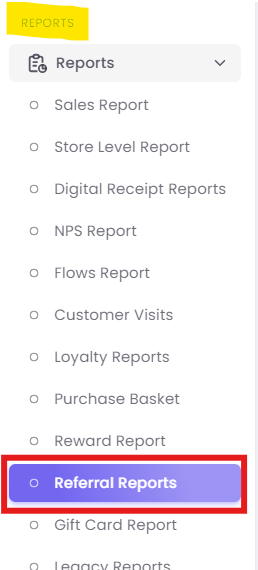
Step track1: Access the performanceReport
Step 1:2: Set Your Global Filters
At the top of the report, you will find several filters to narrow down your data:
-
Mobile Number: Search for the performance of a specific advocate (referrer) or a specific new customer (referee) by their phone number.
-
Email ID: Search by the advocate's or new customer's email address.
-
Date: Select the time period for your analysis (e.g., "Previous 3 months").
-
Code: Search for a specific referral code to see its performance.
Step 2:3: Review High-Level KPIs

-
Total Referrals: This represents the total number of unique advocates (your existing customers) who have successfully referred at least one new customer. In the example, 12 of your customers are brand advocates.
-
New Customers: This is the total number of new customers who were successfully acquired through the referral program.
-
Total Revenue: This shows the total monetary value generated from the purchases made by the new customers acquired via this program.
Step 3:4: Identify Top Performers and Locations
The middle section of the report is split into two widgets to help you quickly identify top performers.

-
A. Top Referrers: This widget is a leaderboard of your most successful advocates.
-
Name: The name of the advocate.
-
Referrals: The total number of new customers this person has brought in. (e.g., "test02" has brought in 6 new customers).
-
-
B. Referral Reports store wise: This widget breaks down where the referral redemptions are happening.
-
Store: The name of the physical store location.
-
Total Redemptions: The number of referral offers redeemed at that specific store. This is useful for seeing which stores are most successful at converting new, referred customers.
-
Step 4:5: Analyze the Detailed Referral Log
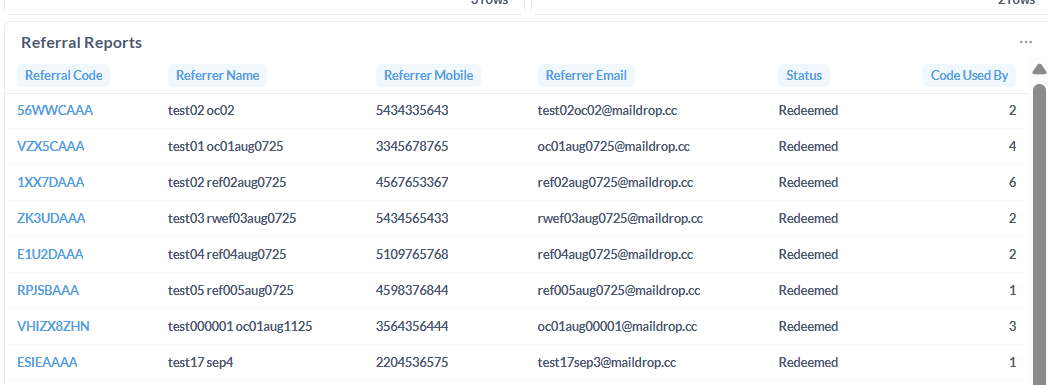
The main table at the bottom, titled Referral Reports, provides a detailed list of all advocates (referrers) who have participated in the program.
-
Referral Code: The unique code assigned to the advocate (e.g.,
56WWCAAA). -
Referrer Name / Mobile / Email: The contact information for the advocate (the person making the referral).
-
Status: The current status of the referral code. "Redeemed" likely indicates that at least one of the friends referred by this advocate has successfully made a purchase.
-
Code Used By: This is a key metric. It shows the total count of new customers who have successfully used this advocate's code. This number should match the
Referralscount in the "Top Referrers" widget.