Accessing and Understanding the Reports
This report is divided into two main tabs:
Customer Visits:A high-level visual dashboard of visit frequency, retention, and timing.Customers Sales:A granular, row-by-row table of every individual transaction.
Access and Filter the Report
Step 1: Navigate to the Report
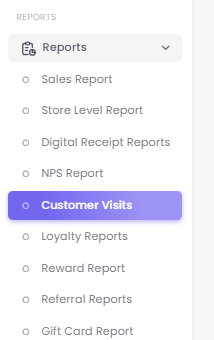
Step 2: Apply Filters
At the top of the report, you will find filters to customize your data. The two most important are:
-
Dates: The time period you wish to analyze (e.g., "Previous 12 months").
-
Max Visits: This filter controls the depth of the Customer Visits Funnel. In the example, "5" is selected, so the funnel will show the drop-off from Visit 1 through Visit 5.

Understanding the "Customer Visits" Tab
This tab provides a visual overview of your customers' visit frequency and repeat behavior. It typically contains three main charts:
A. Customer Visits Count
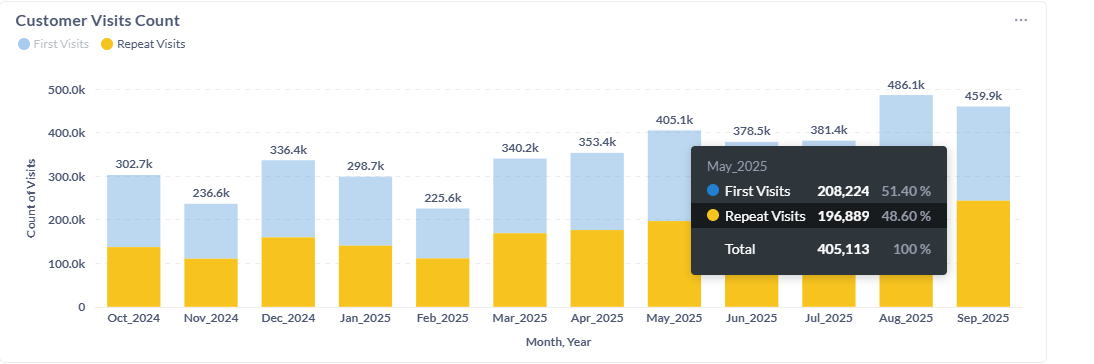
This stacked bar chart displays a month-by-month breakdown of your total visits, split into two key groups:
-
First Visits (Blue): These are new customers making their very first purchase. This is a key indicator of your customer acquisition success.
-
Repeat Visits (Yellow): These are returning customers. This is a key indicator of your customer retention and loyalty.
How to Read This Chart: In the example, August 2025 had the highest total visits (486.1k), with a healthy mix of new and repeat customers. February 2025 had the lowest visits (225.6k), but you can see that the proportion of repeat visits was still significant.
B. Customer Visits Funnel
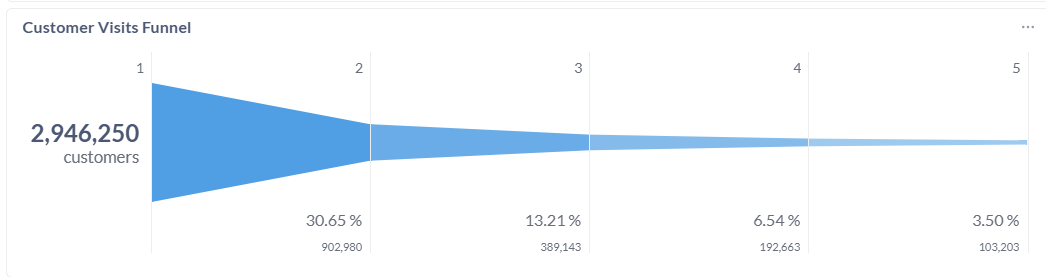
This funnel visualizes your customer retention rate between visits. It shows the percentage of customers who return for a 2nd, 3rd, 4th visit, and so on, based on your "Max Visits" filter.
How to Read This Chart: In the example:
-
Visit 1: 2,946,250 customers made their first visit.
-
Visit 2: Of those, 902,980 returned for a second visit. This is a 30.65% retention rate from visit 1 to 2.
-
Visit 3: 389,143 customers returned for a third visit, and so on.
This funnel is the most direct way to measure your ability to create a repeat customer.
C. Intervals Chart
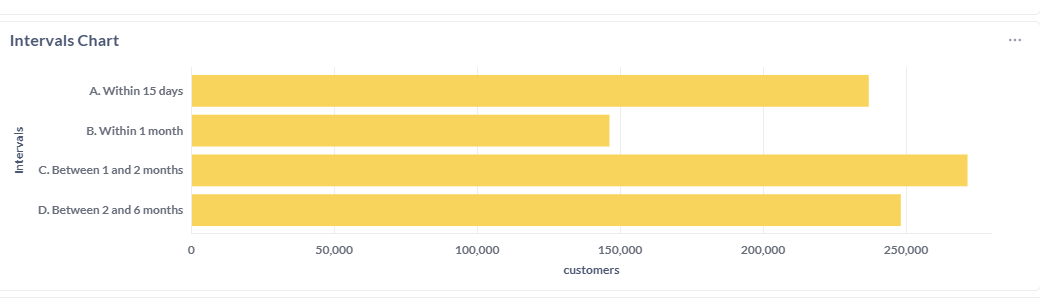
This chart shows the average time it takes for customers to make a repeat visit. It breaks down the number of customers who return within specific timeframes.
How to Read This Chart: This is crucial for understanding your natural purchase cycle. In the example, the largest group of customers (over 250,000) returns "Between 1 and 2 months." This tells you that scheduling a "we miss you" campaign around the 45-day mark would be highly effective, as it targets the largest segment of your audience at the exact time they are naturally thinking about repurchasing.