
OTP Fallback Feature
The OptCulture OTP & Alerts module now includes a flexible OTP fallback feature. This powerful addition ensures that your customers can always receive their one-time passwords, even if the primary delivery method fails. The system is designed to send an alternative message if the initial OTP remains unused for a configurable period.
Step1: Configure the Fallback Message
-
On the configuration page, you'll see a section to "Enable fallback message".
-
Toggle this option ON.
-
A new field will appear where you can enter the number of seconds after which the fallback message should be sent.
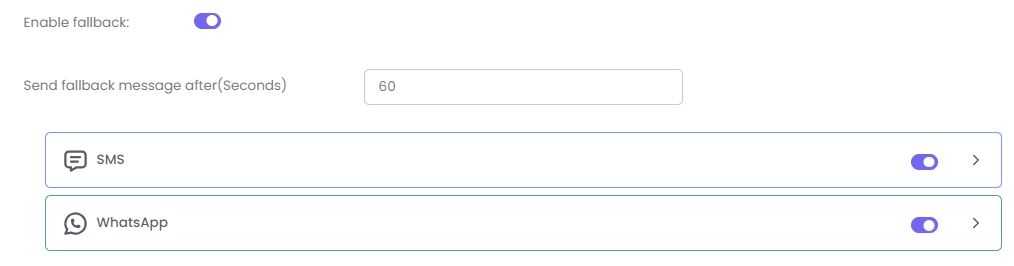
Step2: Select Fallback Channels and Gateways:
-
Under "Fallback Configuration," you can enable additional communication channels like SMS, WhatsApp, or Email.
-
For each channel you enable, you can select a specific Gateway and Template, just like how it would be for the primary channel. This allows you to use a different provider for the fallback message.
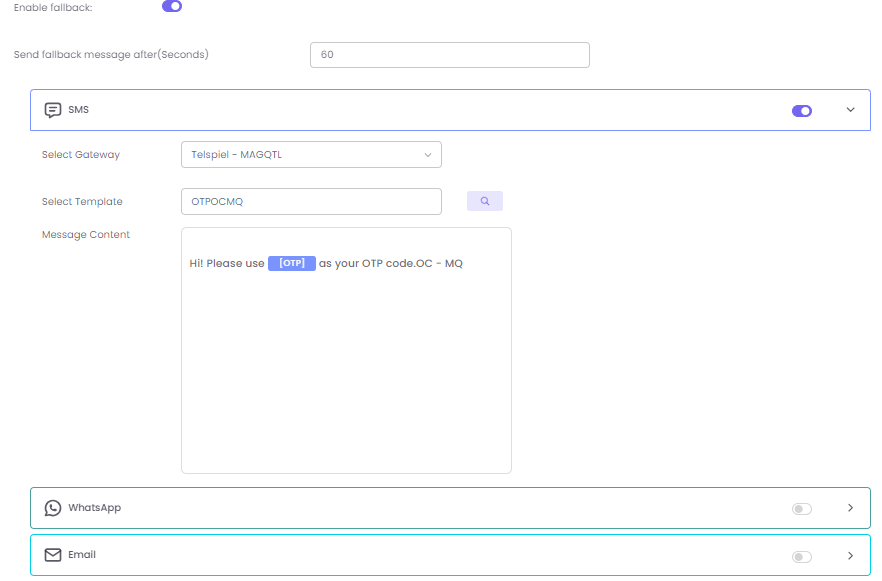
Step3: Save Your Settings
Once you have configured the fallback options, click Save to activate the alert with the new settings.